Discussion
Loading...

#Tag

  • About
  • Code of conduct
  • Privacy
  • About Bonfire
Em :official_verified:
Em :official_verified: boosted
Scott Wilson
@scottwilson@infosec.exchange  ·  activity timestamp 15 hours ago

How to add DuckDuckGo (noai) to Google Chrome and Brave

(Also, see my similar post about doing this for Vivaldi - https://infosec.exchange/@scottwilson/115725021729571844, and for Firefox - https://infosec.exchange/@scottwilson/115725250696632578)

If you prefer an AI-free DuckDuckGo Search experience, you can use noai.duckduckgo.com instead of on duckduckgo.com. Searching on noai.duckduckgo.com works the same as search on duckduckgo.com, except all AI features are turned off and AI-generated images are filtered out of results by default.

NOTE: Truly, for better privacy, consider switching to Firefox, LibreWolf, Vivaldi, Brave, or Tor.

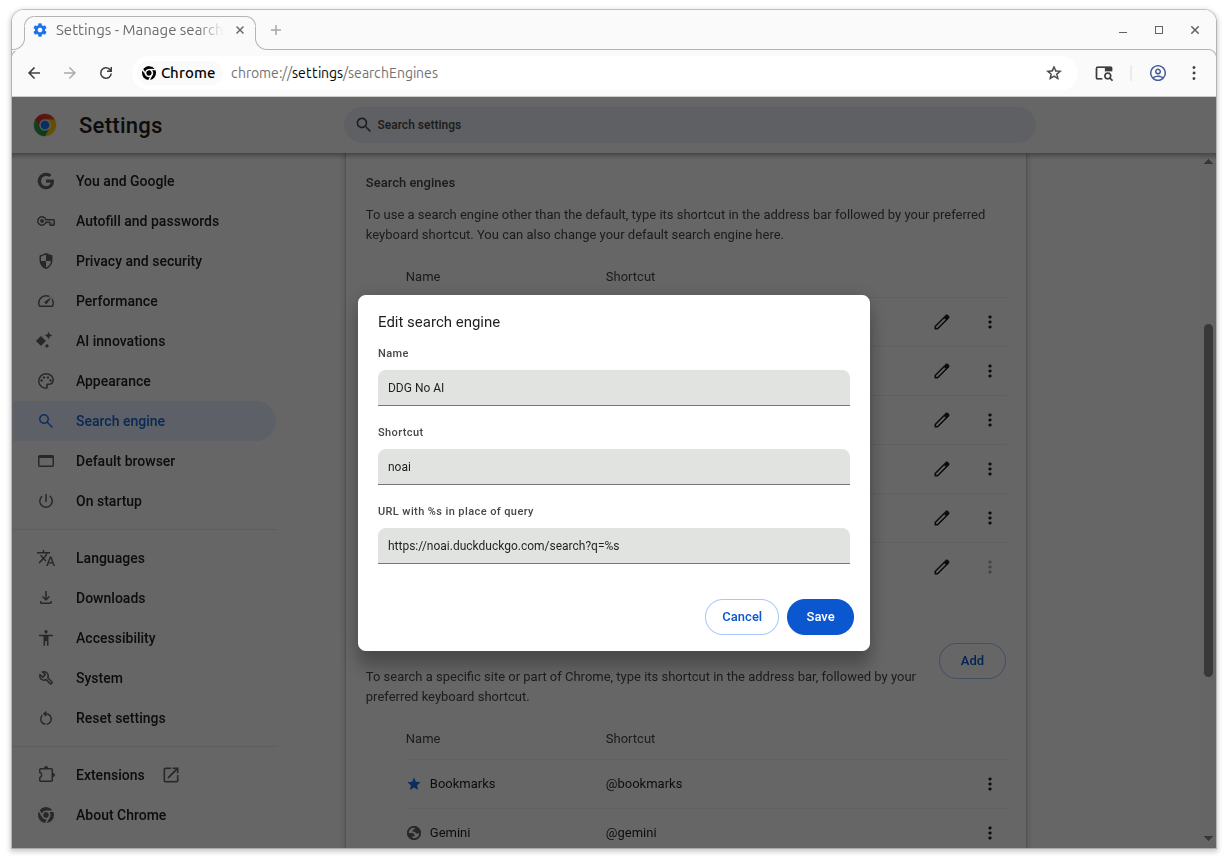
1. In Google Chrome or Brave, go to Settings, then Search Engines.

2. Click "Manage search engines and site search".

3. Scroll down to the "Site search" section, and lick the "Add" button.

4. Give it a meaningful name and nickname, and add "https://noai.duckduckgo.com/search?q=%25s" in the URL field.

5. Click "Add", then scroll up a little to the "Search engines" section. Find your new entry, click the three dots next to it, and select "Default" to make this the default search engine.

6. Exit Settings.

#search #ai #privacy #google #chrome #googlechrome #brave

Thanks to: @voltooidverledentijd

References:
- https://voltooidverledentijd.noblogs.org/post/2025/11/23/how-to-add-duckduckgo-noai-to-firefox/
- https://duckduckgo.com/duckduckgo-help-pages/ai-features/about-noaiduckduckgocom

About noai.duckduckgo.com - DuckDuckGo Help Pages

Starting your searches on noai.duckduckgo.com works the same as duckduckgo.com, just with AI features turned off.

%s at DuckDuckGo

DuckDuckGo. Privacy, Simplified.
Screen shot of Google Chrome's custom search engine settings
  • Copy link
  • Flag this post
  • Block
Scott Wilson
@scottwilson@infosec.exchange  ·  activity timestamp 15 hours ago

How to add DuckDuckGo (noai) to Google Chrome and Brave

(Also, see my similar post about doing this for Vivaldi - https://infosec.exchange/@scottwilson/115725021729571844, and for Firefox - https://infosec.exchange/@scottwilson/115725250696632578)

If you prefer an AI-free DuckDuckGo Search experience, you can use noai.duckduckgo.com instead of on duckduckgo.com. Searching on noai.duckduckgo.com works the same as search on duckduckgo.com, except all AI features are turned off and AI-generated images are filtered out of results by default.

NOTE: Truly, for better privacy, consider switching to Firefox, LibreWolf, Vivaldi, Brave, or Tor.

1. In Google Chrome or Brave, go to Settings, then Search Engines.

2. Click "Manage search engines and site search".

3. Scroll down to the "Site search" section, and lick the "Add" button.

4. Give it a meaningful name and nickname, and add "https://noai.duckduckgo.com/search?q=%25s" in the URL field.

5. Click "Add", then scroll up a little to the "Search engines" section. Find your new entry, click the three dots next to it, and select "Default" to make this the default search engine.

6. Exit Settings.

#search #ai #privacy #google #chrome #googlechrome #brave

Thanks to: @voltooidverledentijd

References:
- https://voltooidverledentijd.noblogs.org/post/2025/11/23/how-to-add-duckduckgo-noai-to-firefox/
- https://duckduckgo.com/duckduckgo-help-pages/ai-features/about-noaiduckduckgocom
About noai.duckduckgo.com - DuckDuckGo Help Pages

Starting your searches on noai.duckduckgo.com works the same as duckduckgo.com, just with AI features turned off.

%s at DuckDuckGo

DuckDuckGo. Privacy, Simplified.
Screen shot of Google Chrome's custom search engine settings
  • Copy link
  • Flag this post
  • Block
Em :official_verified:
Em :official_verified: boosted
Lauren Weinstein
@lauren@mastodon.laurenweinstein.org  ·  activity timestamp 2 days ago

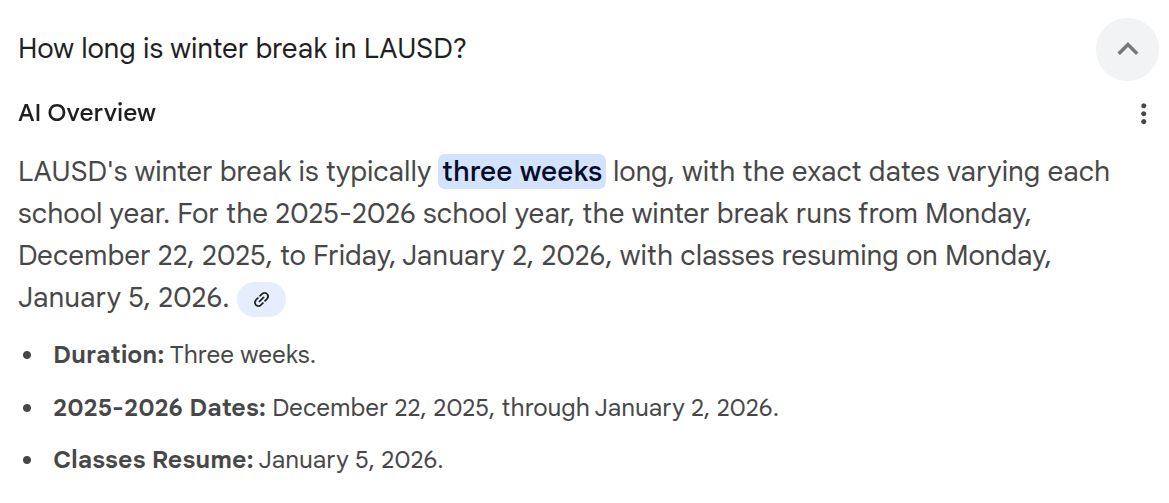
Yep, Cosplay Hegseth wants the entire U.S. military depending on #Google AI, but Google AI still can't even get simple math correct, like the difference between 2 weeks and 3 weeks? Eh?

Sorry, no caption provided by author
  • Copy link
  • Flag this post
  • Block
Lauren Weinstein
@lauren@mastodon.laurenweinstein.org  ·  activity timestamp 2 days ago

Yep, Cosplay Hegseth wants the entire U.S. military depending on #Google AI, but Google AI still can't even get simple math correct, like the difference between 2 weeks and 3 weeks? Eh?

Sorry, no caption provided by author
  • Copy link
  • Flag this post
  • Block
Lauren Weinstein
@lauren@mastodon.laurenweinstein.org  ·  activity timestamp 2 days ago

Yep, Cosplay Hegseth wants the entire U.S. military depending on #Google AI, but Google AI still can't even get simple math correct, like the difference between 2 weeks and 3 weeks? Eh?

Sorry, no caption provided by author
  • Copy link
  • Flag this post
  • Block
Beardy Star Stuff 🏴🌹🇵🇸
@dennyhenke@social.coop  ·  activity timestamp 3 days ago

Stories like this are yet another reason to pull your data from the cloud/ID services provided by #Apple, #Microsoft, #Google. You think you're fine, that it won't happen to you. Until it does.

It's possible to have your own fully synced local "cloud" for files. I have an iPad, Mac, and two computers running GNU/Linux with the same files thanks to Syncthing. All in the background and backed up locally to external drives.

Fully private and secure.

#BigTech #Capitalism

https://hey.paris/posts/appleid/

20 Years of Digital Life, Gone in an Instant, thanks to Apple

Summary: A major brick-and-mortar store sold an Apple Gift Card that Apple seemingly took offence to, and locked out my entire Apple ID, effectively bricking my devices and my iCloud Account, Apple Developer ID, and everything associated with it, and I have no recourse. Can you help? Email paris AT paris.id.au (and read on for the details). ❤️ Here’s how Apple “Permanently” locked my Apple ID. I am writing this as a desperate measure.
  • Copy link
  • Flag this post
  • Block
Em :official_verified:
Em :official_verified: boosted
Tuta
@Tutanota@mastodon.social  ·  activity timestamp 6 days ago

🚨 World's first social media ban begins: Australian & under‑16? Your social media account is now locked. 🚨

What's next? From Dec 27 #AgeVerification checks for search engines like #Google.

BUT - Once your data is in the system, what's stopping it from being used for surveillance?

And what happened to #Privacy? 🧐

#DigitalID #Australia

YouTube already has it ➡️ https://tuta.com/blog/how-to-turn-off-youtube-ai-age-verification

Tuta

YouTube AI Age Verification: What it is & how to turn it off. | Tuta

Did YouTube ask you to verify your age with ID or credit card? You're not alone! YouTube AI is increasingly trying to estimate how old you are based on your habits following the global push for age verification.
Notice from YouTube: You must be 16+ to sign in to YouTube in Australia.
  • Copy link
  • Flag this post
  • Block
Tuta
@Tutanota@mastodon.social  ·  activity timestamp 6 days ago

🚨 World's first social media ban begins: Australian & under‑16? Your social media account is now locked. 🚨

What's next? From Dec 27 #AgeVerification checks for search engines like #Google.

BUT - Once your data is in the system, what's stopping it from being used for surveillance?

And what happened to #Privacy? 🧐

#DigitalID #Australia

YouTube already has it ➡️ https://tuta.com/blog/how-to-turn-off-youtube-ai-age-verification

Tuta

YouTube AI Age Verification: What it is & how to turn it off. | Tuta

Did YouTube ask you to verify your age with ID or credit card? You're not alone! YouTube AI is increasingly trying to estimate how old you are based on your habits following the global push for age verification.
Notice from YouTube: You must be 16+ to sign in to YouTube in Australia.
  • Copy link
  • Flag this post
  • Block
Log in

Gnar🔥 social

Federated bonfire social space for those into gnarly adventures. From shredding mountains to guitars if you enjoy gnar, come share your stoke and adventures!

Gnar🔥 social: About · Code of conduct · Privacy ·
Gnar-fire social · 1.0.0-rc.2.33 no JS en
Automatic federation enabled
  • Explore
  • About
  • Code of Conduct
Home
Login